Data quality
Data quality is the first analysis stage. It answers one question before any coverage is calculated: can the facility data be trusted? Five pages, under Data quality in the RMNCAH app and Data Quality Assessment in the Vaxx app, show how complete, plausible and consistent the routine data are. Their results decide whether you remove years and how you adjust the data in Data preparation. The method is explained in Data quality assessment.
When to use it
Use these pages right after loading the data, and again whenever you upload a corrected file. Load Data must be finished first; these pages do not need Data Adjustment. Review them in this order: Reporting Rate, Outlier Detection, Data Missingness, Internal Consistency, Overall Data Quality Score. Then move on to Data preparation.
Common filters
RMNCAH
Most pages have an Indicator chip, an Admin Level chip (Admin 1 or Admin 2) and, when Admin 1 is selected, a region chip with Select All to focus on one region. The Reporting Rate page adds a Performance Threshold (see Reporting Rate).
How to use the pages
Open the page from the sidebar
The pages are under Data quality (RMNCAH) or Data Quality Assessment (Vaxx). Load Data must be finished first.
Set the filters
Choose the indicator, the admin level and, if you want, a region, as described in Common filters.
Read the chart, then the table below it
Charts show the pattern. Tables list the districts and months behind it. Use the toolbar of a card for Download Plot (PNG) and Download Data (Excel), and the This table only year selector for tables.
Reporting Rate
Shows how completely facilities reported, by service, year and area.
Choose the service, threshold and admin level
RMNCAH
- Indicator: ANC, Institutional Delivery, Vaccination, OPD.
- Performance Threshold: default 90%; quick picks 70, 80, 90, 95.
- Admin Level.
Read Sub-National Reporting Rate
The Heat Map tab shows the reporting rate of the selected service for each area and year. The Bar Graph tab shows the rate by year.
Read the National Reporting Rate card and the table
The National Reporting Rate card (in the RMNCAH app, District Reporting Rate in a region when a region is chosen) shows the percentage of districts whose reporting rate is below the threshold (low reporting), one panel per service, by year. Sub-National Units with Low Reporting lists the districts or regions below the threshold for the selected year and service.
What the reporting rate measures and how to read it: Data quality > Reporting completeness and Reporting rates.
The Performance Threshold you set here is stored in the dataset and reused by the Overall Data Quality Score and, in the RMNCAH app, the Service Utilization DQA.
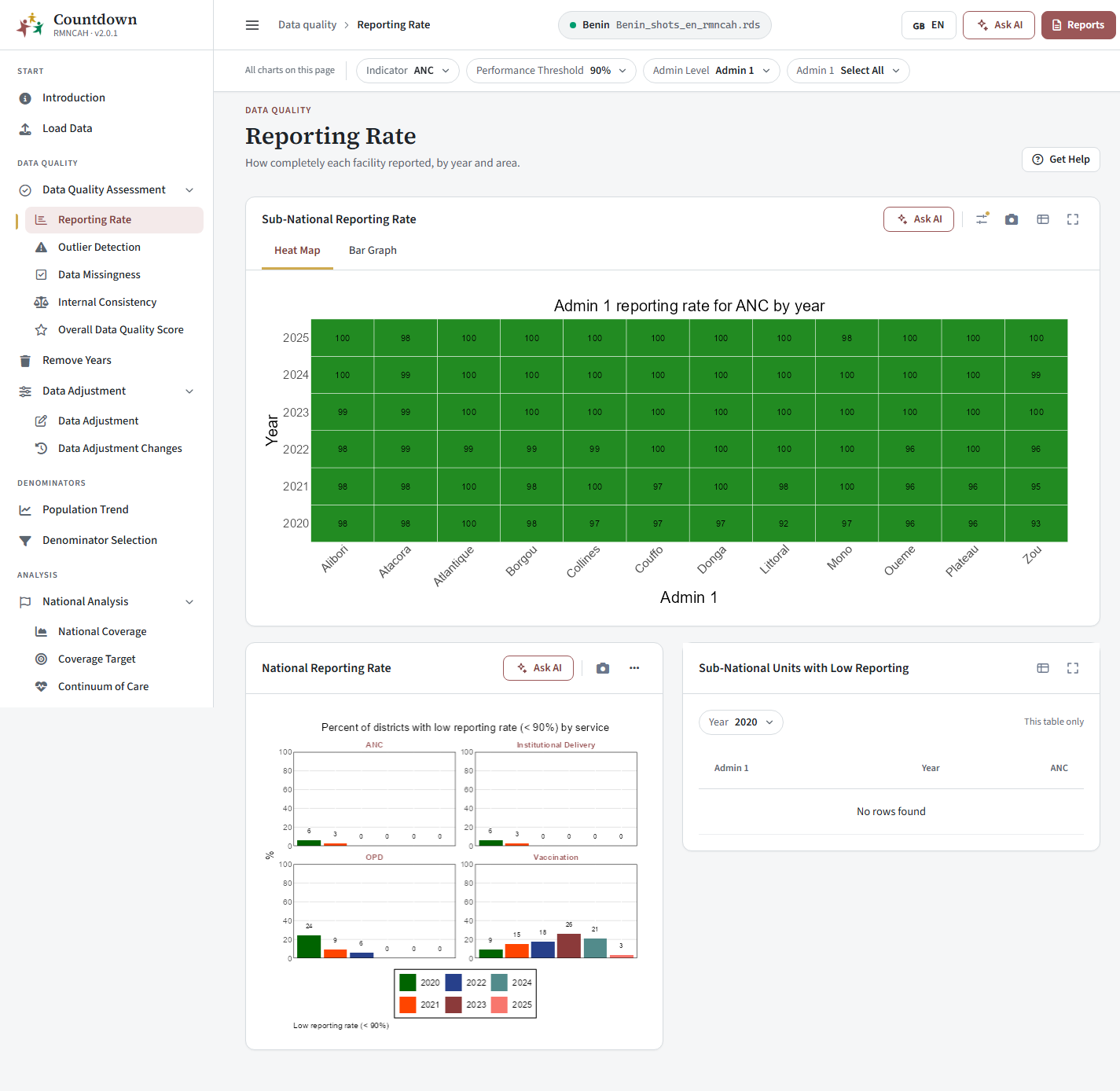 Sub-national reporting rate heat map
Outlier Detection
Finds extreme monthly values that may be data entry errors. What counts as an extreme outlier: Data quality > Outlier detection.
- Filters: Indicator and Admin Level.
- Indicators with Outliers card: tabs Heat Map (percent of monthly values that are not outliers, by area and year), Indicator Bar Graph (by year and indicator) and Region Bar Graph (by year and region).
- Sub-National Units with Extreme Outliers: every flagged district and month, in a table of year, month, area, reported value, median and MAD. Pick the year with the This table only control.
- Sub-National Trends: pick a region and read the month-by-month plot for the selected year: the reported value against the median, the outlier bounds (plus or minus 5 MAD) and the outliers.
How to read it (the expected share of values free of outliers, campaigns): Data quality > Outliers.
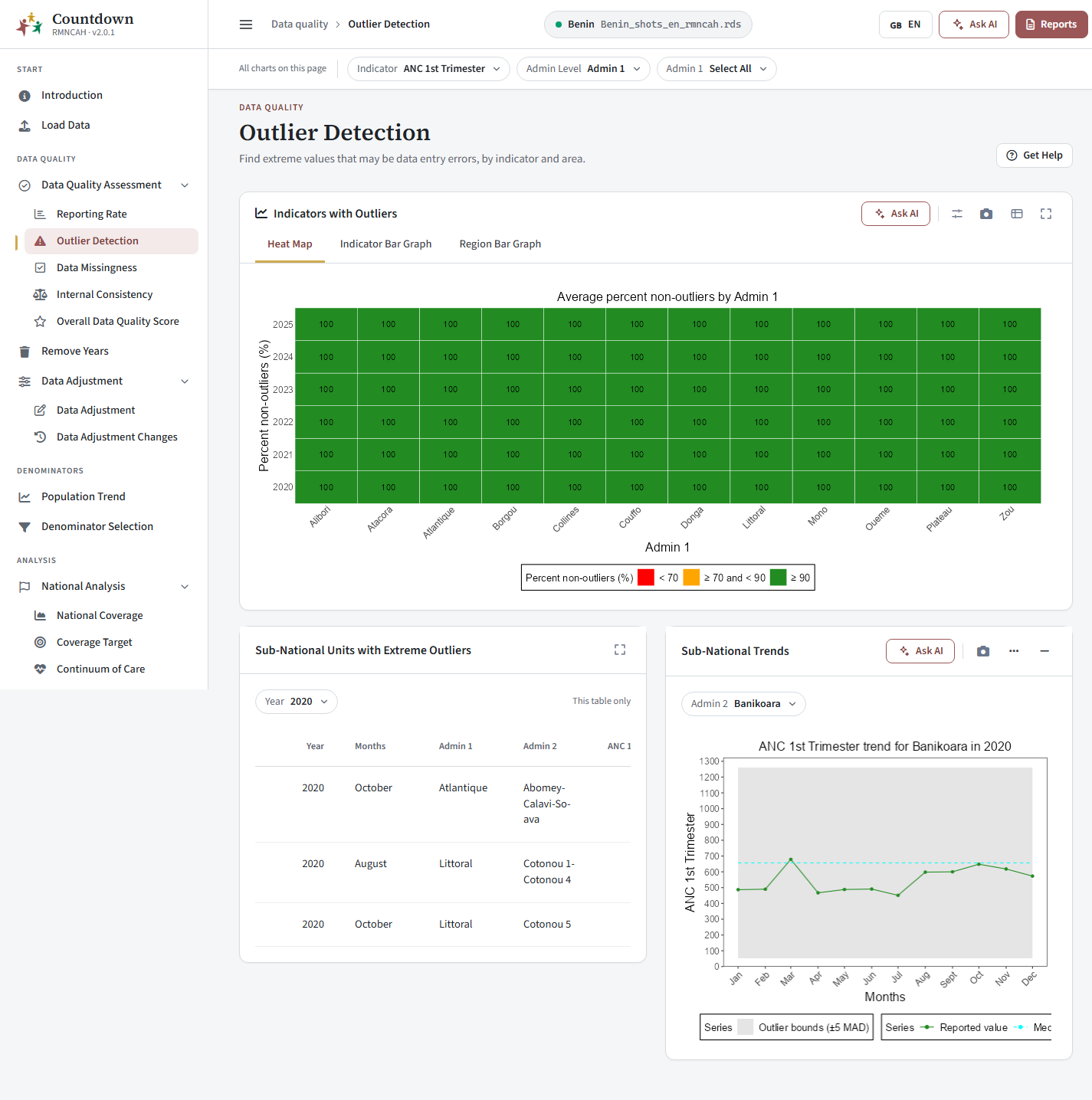 Outlier detection heat map
Data Missingness
Shows which indicators and areas have missing reports.
- Filters: Indicator (with Select All) and Admin Level.
- Indicators with Missing Data: tabs Heat Map (percent of missing reports by year and area), Complete Indicators (percent of districts with complete data for the indicator) and Missing Indicators by Region (trend in completeness by region).
- Sub-National Units with Missing Data: a table of the districts with gaps (incomplete data) for the selected indicator and year.
How missing values are measured and handled: Data quality > Data missingness.
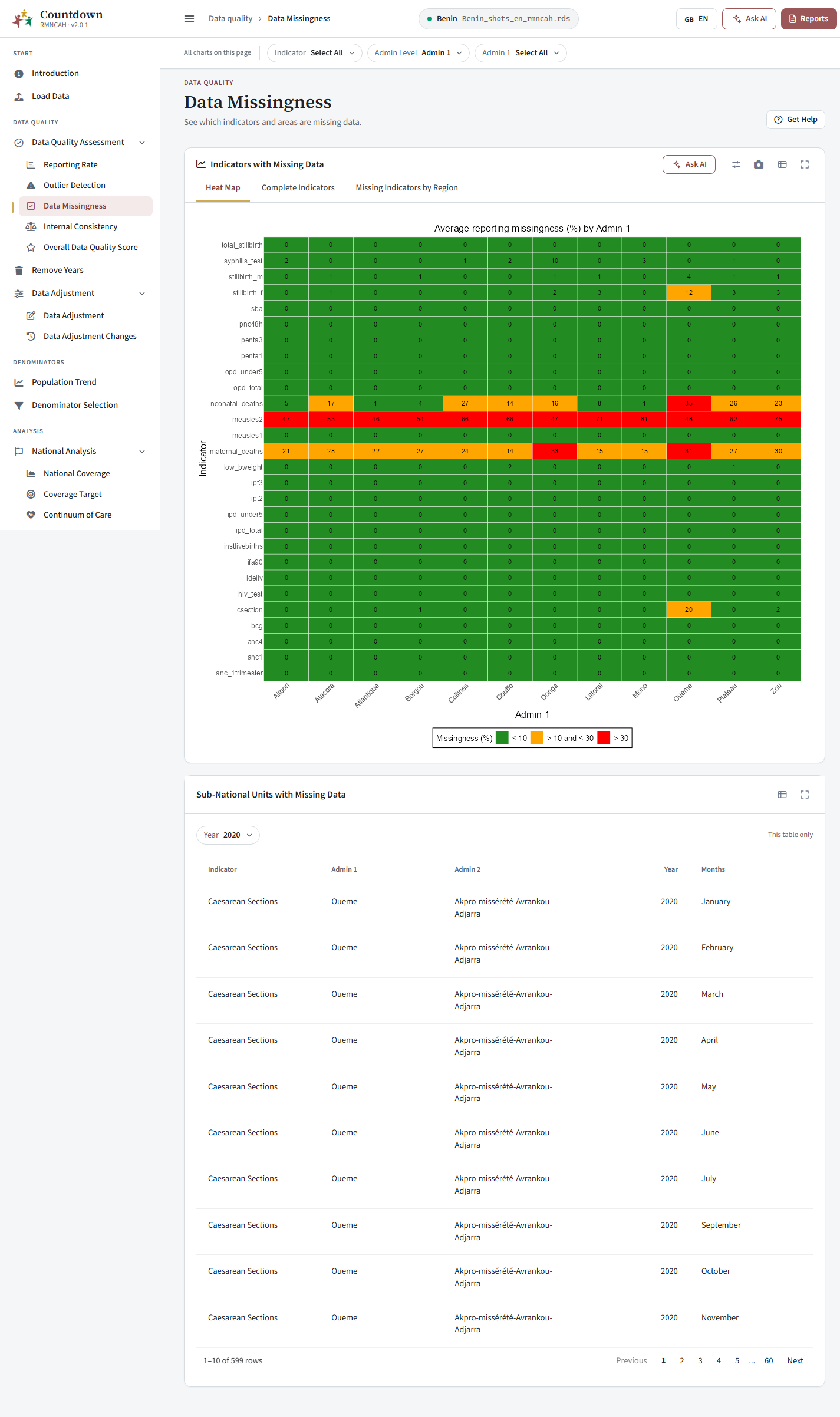 Data missingness heat map
Internal Consistency
Checks that related indicators move together and agree over time. Two cards are shown: Ratio Plots and Consistency Checks. The expected ratios and the range a district must fall in: Data quality > Internal consistency. How to read the plots: Data quality > Consistency and ratios.
RMNCAH
- Ratio Plots: the yearly ratios ANC1 / Penta1 and Penta1 / Penta3 against the expected ratio. Expected ratios come from the survey coverage values entered in National Rates.
- Consistency Checks: tabs ANC1 and Penta1, Penta1 and Penta3 and Custom Check (choose an X axis and a Y axis). Each dot is a district, shown with a Linear fit and a Diagonal.
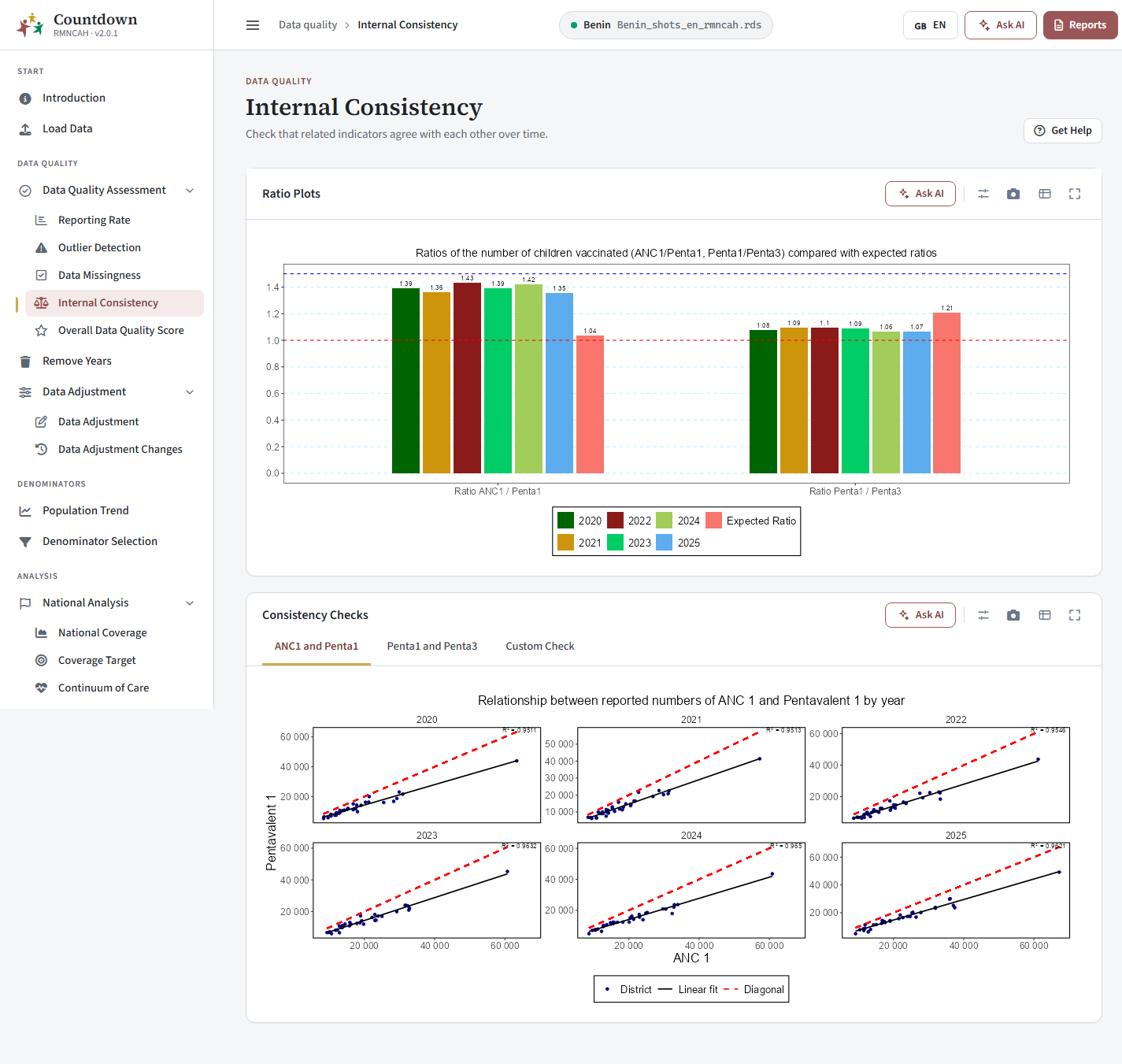 Ratio plots
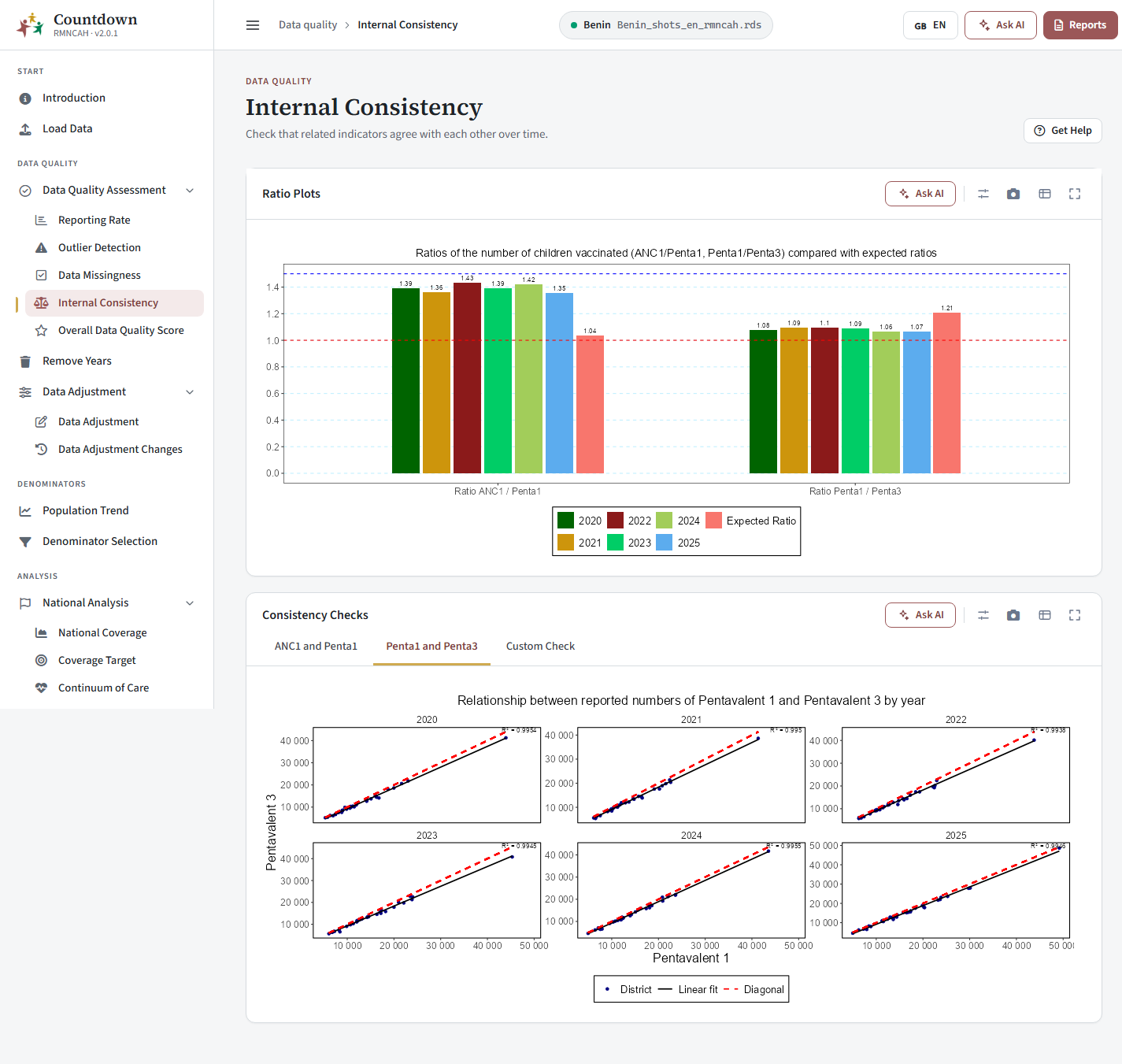 Consistency checks between ANC1 and Penta1
Overall Data Quality Score
One annual score across all checks: one table per year, with a region filter to see a single Admin 1 area, or the national level. How the score is computed: Data quality > Overall quality score.
RMNCAH
| Block | Rows |
|---|---|
| 1. Completeness | % of expected monthly facility reports (national); % of districts at or above the threshold; % of districts with no missing values for the 4 forms |
| 2. Extreme outliers | % of monthly values that are not extreme outliers; % of districts with no extreme outliers |
| 3. Consistency | Ratios ANC1 / Penta1 and Penta1 / Penta3; % of districts within the expected range |
The last row is the Annual data quality score. Use Download Plot and Download Data. Generate Report opens the data quality report.
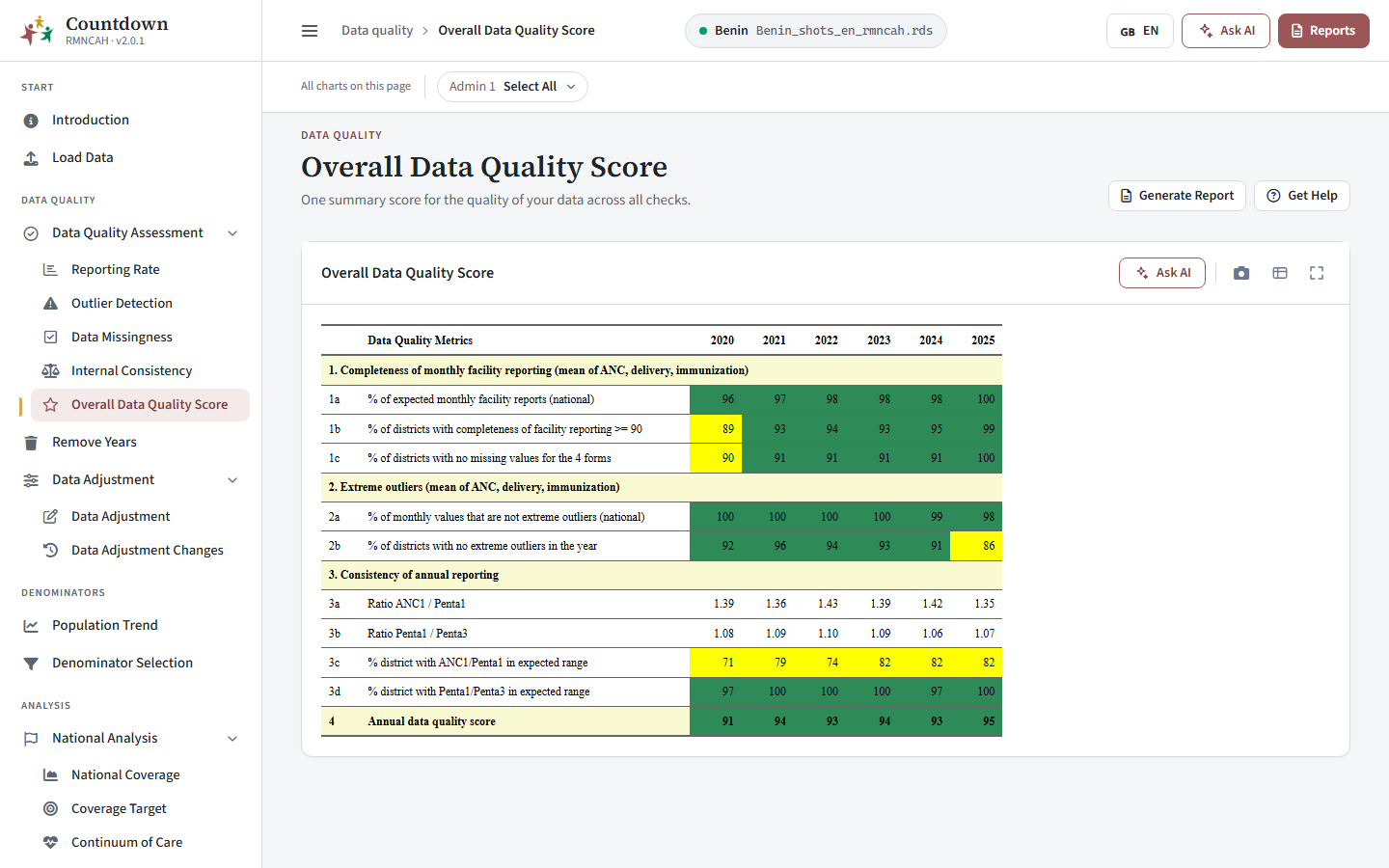 Overall data quality score
Interpretation and pitfalls
How to read the results, and what to watch for before you remove years or adjust: Data quality > Interpretation, including its Common pitfalls.
Next: Data preparation.