Denominators
Coverage is the number of people who received a service divided by the number who needed it; the denominator has to be estimated (see Denominators > Service coverage). The Denominators section has two pages, Denominator Assessment and Denominator Selection. The method is described in Denominator assessment and selection.
RMNCAH
Both pages unlock after Data preparation.
When to use it
Use these pages after adjustment and before reading any coverage result. Repeat them if you change the adjustment or the survey inputs. Denominator Assessment comes first, before Denominator Selection.
Denominator options
The UN projection of live births is shown in the comparison charts only; it is not one of the choices in the selectors. The other options are:
RMNCAH
The Maternal denominator and Vaccination denominator selectors offer the other five options.
| Option in the app | Meaning |
|---|---|
| UN | UN projection of live births |
| DHIS2 | DHIS2 projection of live births |
| ANC 1 | Derived from women attending a first antenatal visit |
| Pentavalent 1 | Derived from children receiving the first pentavalent dose |
| ANC 1 Population Growth | ANC 1 derived, adjusted for annual population growth |
| Penta 1 population Growth | Penta 1 derived, adjusted for annual population growth |
What each option is, and how the derived populations are computed from the survey rates: Denominators > Denominator options and Computing the derived denominators.
Denominator Assessment
Purpose. Compare population trends across the available sources and decide which population indicator is consistent between the UN and DHIS2 projections (what that choice drives: Denominators > Population trend comparison).
Open Denominator Assessment
It is the first page of the Denominators section (Population Trend in the Vaxx app).
Compare the three tabs
The card Population Comparison has the tabs Population, Births and Under 1. Each plots the UN projection against the DHIS2 projection in thousands, by year. The Births tab shows DHIS2 live births and DHIS2 total births.
Select Best Population
In the filter bar choose the population source that is most consistent with the UN: Live births (DHIS2), Total births (DHIS2), Total population (DHIS2) or Under 1 year (DHIS2).
How to choose, and what gaps or breaks between the lines mean: Denominators > Population trend comparison and Reading the population trends.
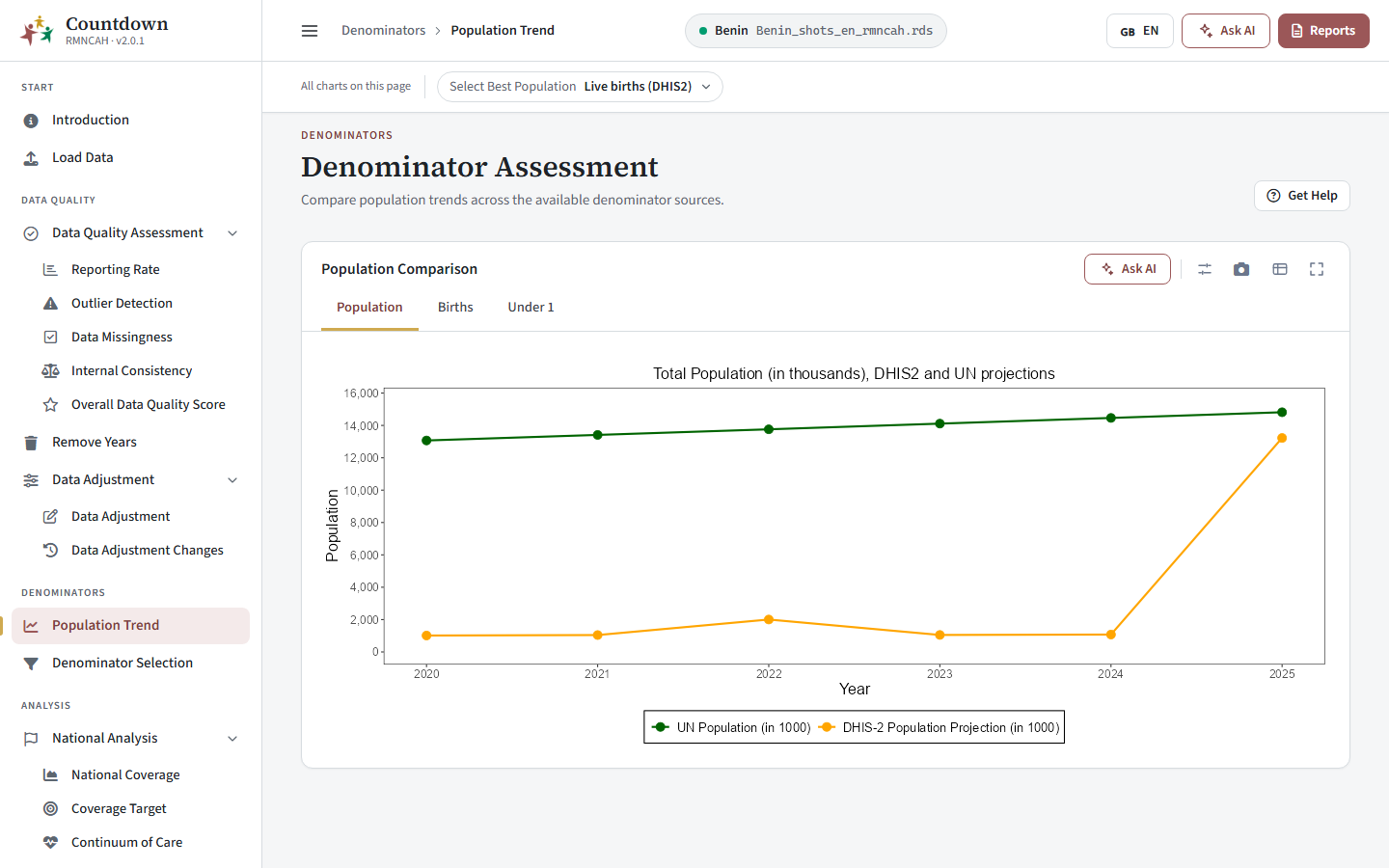 Population comparison between UN and DHIS2
Denominator Selection
Purpose. Compare coverage under each denominator option and choose the best denominator. The choice is what the rest of the analysis uses; it appears afterwards in the Denominator row (the denominator chip) of every analysis page.
RMNCAH
Choose the best denominator for vaccination indicators and for maternal indicators.
Filters. Maternal denominator, Vaccination denominator and Admin Level (National, Admin 1 or Admin 2, with a region chip). The two denominator choices are what the rest of the analysis uses.
Three cards support the decision:
Read the survey comparison (National Coverage)
RMNCAH
For each indicator tab (Institutional Live Births and Pentavalent 3) the bars show facility-based coverage in the survey year under each denominator, compared with the national survey coverage.
How to read it: Denominators > Denominator selection examination (a).
If survey estimates are missing, the card shows No coverage to show yet and a Go to Load Data button. Add the survey values in the National Rates step.
Check the regional pattern (Subnational Derived Coverage)
Subnational Derived Coverage compares coverage by region and denominator in the survey year. How to read it: Denominators > Denominator selection examination (b).
In the Vaxx app its tabs are Pentavalent 1, Pentavalent 3 and Measles 1.
Check the trend (Population Trend)
The Population Trend card (on this page it means coverage over time) shows national coverage over time, or coverage for the selected area, for each denominator, including the UN population in the Vaxx app. Use the Admin Level filter (National, Admin 1, Admin 2) and the region selector to look at one area. How to read it: Denominators > Denominator selection examination (c).
In the Vaxx app its tabs are Pentavalent 1, Pentavalent 3 and Measles 1.
Choose the denominator
RMNCAH
Set the Maternal denominator and the Vaccination denominator, and record why in your notes. How to combine the three views: Denominators > Final selection and synthesis.
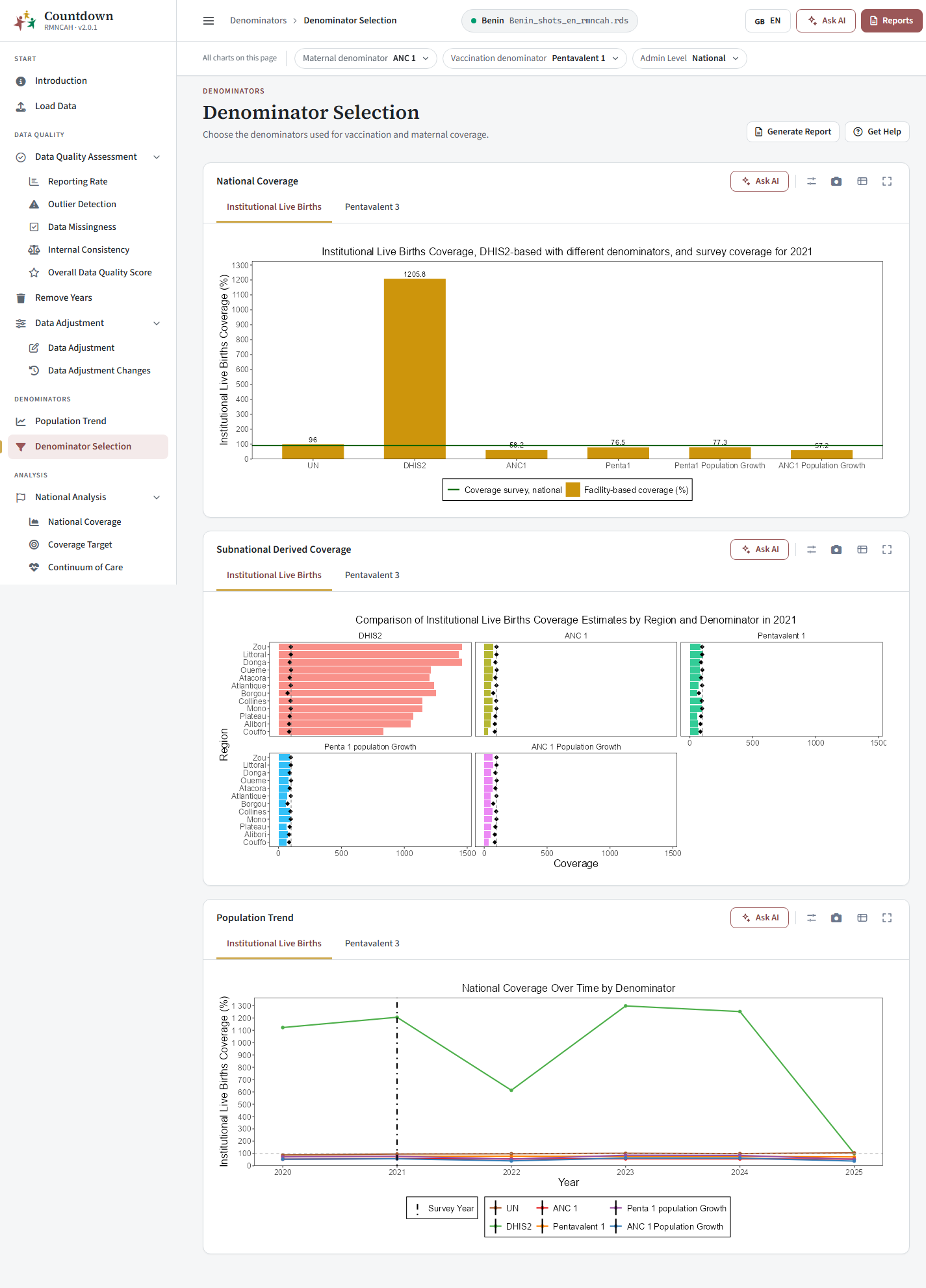 Best denominator selection
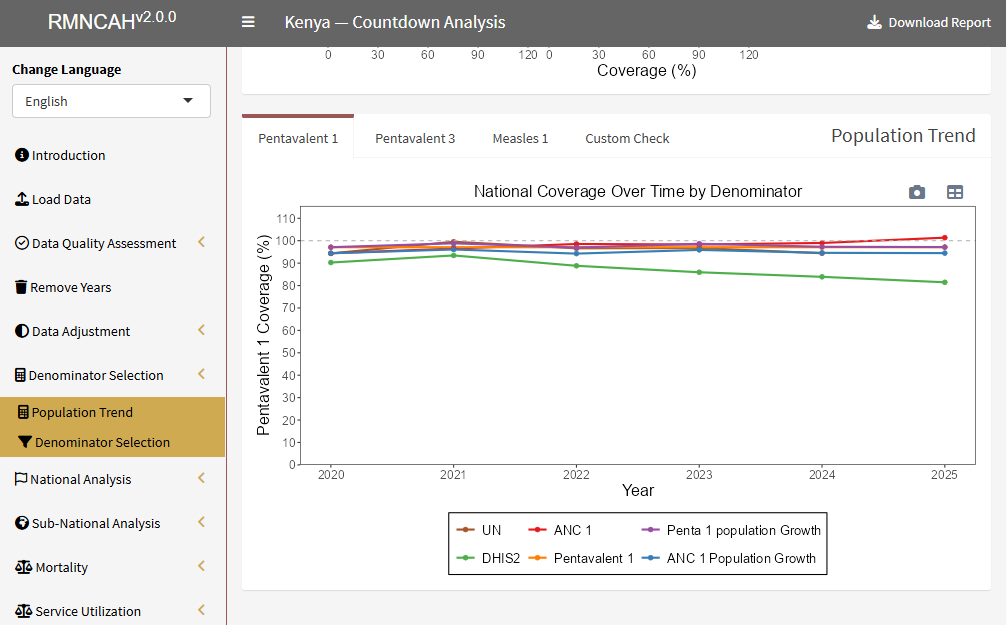 National coverage over time by denominator
How to interpret the results
What makes a denominator the best one, and what to watch for: Denominators > Final selection and synthesis and Common pitfalls.
- The denominator label appears on every analysis page (in the Vaxx app, the vaccination denominator chip). If results look odd, check it first, then return to Data quality.
The denominator you select changes every coverage, inequality, target, mortality and health system chart. If you change it later, review the pages that depend on it and regenerate any exported figures.
Common pitfalls
- Missing survey coverage values in Load Data, which leaves the survey comparison empty.
- Setting the denominator again for each chart: it is set once, on Denominator Selection, for the whole analysis. For pitfalls in choosing it, see Denominators > Common pitfalls.
Next: Coverage, equity and targets.