Coverage, equity and targets
These four pages sit in the National Analysis group of the sidebar: National Coverage, Coverage Target, National Inequality (routine data) and Equity Assessment (survey data). All of them need Data Adjustment to have been run (adjusted data) and use the denominators chosen on Denominator Selection. Sub-national versions are in Sub-national analysis. Methods are in National coverage and Equity assessment.
RMNCAH
The pages use the maternal and vaccination denominators chosen on Denominator Selection.
Indicators available
Each page shows a strip of tabs, one indicator per tab, and most strips end with a tab for any other indicator.
RMNCAH
The default indicator tabs are ANC 4 Visits, Institutional Live Births, Low Birth Weight, Pentavalent 3 and Measles 1 (National Coverage also has FP Projection). The Custom tab covers any other indicator.
National Coverage
Purpose. Compare facility-based (DHIS2) coverage with survey and WUENIC estimates of national coverage for each indicator.
When to use it. After denominators are chosen, to judge whether facility trends are believable.
Open National Coverage
RMNCAH
There are no filters. The page uses the national level and the denominators you selected.
Pick an indicator tab
RMNCAH
Tabs: ANC 4 Visits, Institutional Live Births, Low Birth Weight, Pentavalent 3, Measles 1, FP Projection (see Advanced analysis) and Custom for any other indicator.
Read the chart
The chart is titled “National … Coverage Estimates” and plots by year the DHIS2 estimate, the WUENIC estimate and the Survey estimate with its 95% CI, from 2010. The caption names the denominator that the DHIS2 values use.
Use the chart tools
Each chart has a toolbar to edit labels, change view or style, download the image (Download Plot) and download the data (Download Data). See Exports, reports and AI.
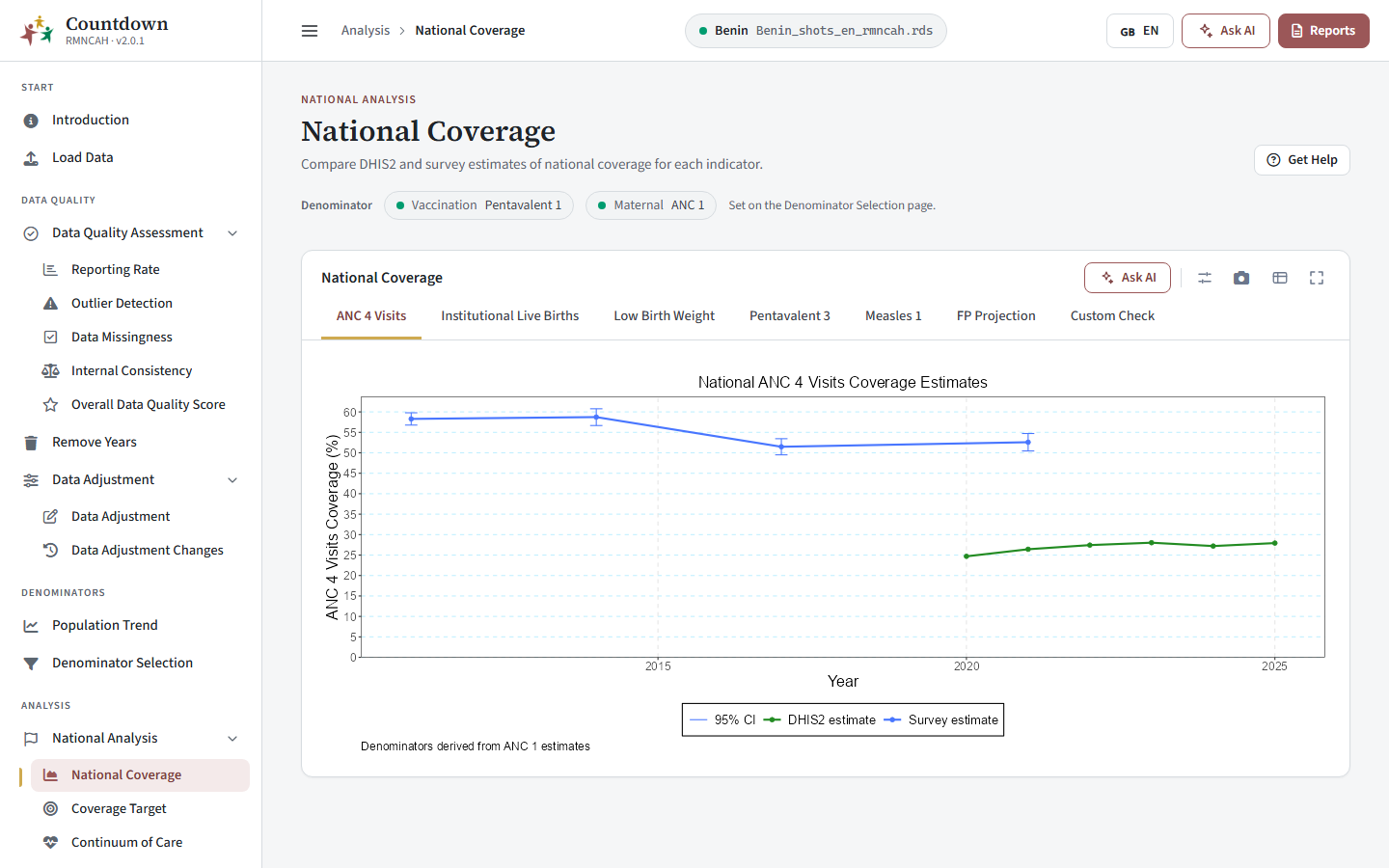 National coverage
How to interpret National Coverage
What agreement or a gap between the lines means: National coverage > Interpreting the national trend. To follow up a gap, return to data quality and denominators.
Coverage Target
Purpose. Show the percentage of regions or districts (sub-national units) that reach a global coverage target, by year.
Filter. Admin Level (Admin 1 or Admin 2).
The chart title states the rule or threshold that was applied, for example the percentage of units meeting the target, and the bars show the percentage of units meeting it by year and indicator. The thresholds applied to regions and districts are in Subnational analysis > Target values.
RMNCAH
Tabs are ANC 4 Visits, Institutional Live Births and Vaccine (BCG, Pentavalent 3 and Measles 1). Dropout targets are in the Vaxx app only.
Below the chart a table, Target Rate by Region (Admin 1) or Districts Meeting the Coverage Target (Admin 2), lists the units that reach the target for the indicator you choose in the This table only control.
The same page for regions and districts is described under Sub-national analysis. Read the chart title for the direction of the rule (for dropout, lower is better). How to read the percentages: Subnational analysis > Global coverage targets.
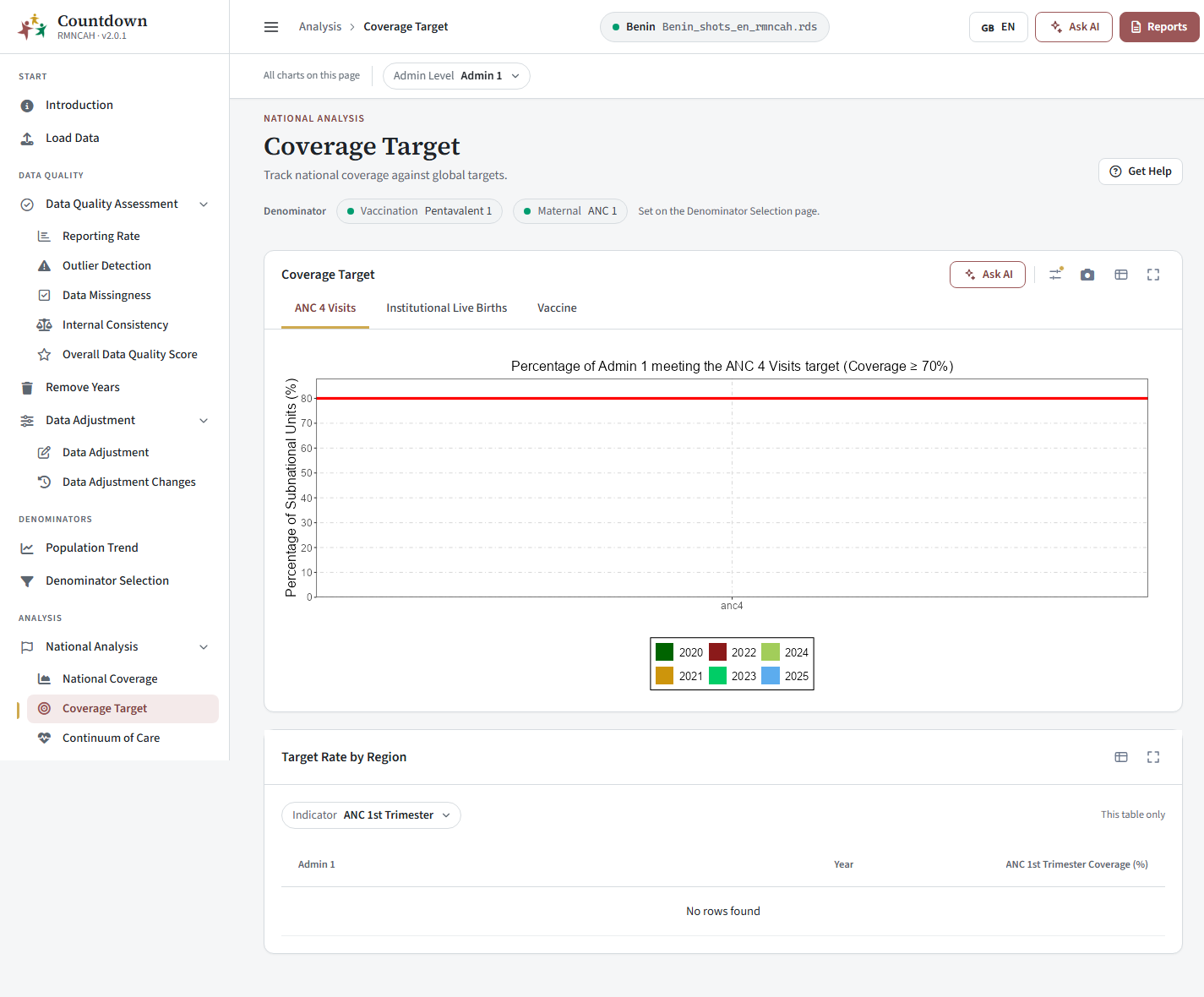 Coverage against targets
National Inequality (routine data)
Purpose. See how much regions differ from the national figure, using facility data.
The card National Inequality (in the Vaxx app, the Routine Data page) has one tab per default indicator plus the Custom (Custom Check) tab, as above. Each chart shows coverage in every Admin 1 region by year (subtitle “Subnational unit: admin 1 level”): each dot is an Admin 1 region and the line is National Coverage. How to read the spread: Subnational analysis > Inequality. Investigate the weak areas in Sub-national analysis.
RMNCAH
Tabs: ANC 4 Visits, Institutional Live Births, Low Birth Weight, Pentavalent 3, Measles 1 and Custom.
Under it, choose Select Years and a Palette (Greens, Blues, Reds or Purples) for the Sub-National Mapping card, which maps the coverage of each region for the selected years. In the Vaxx app each tab of the mapping card draws a map titled “Distribution of … by Regions” from DHIS2 data, and the map follows the tab selected in the inequality card.
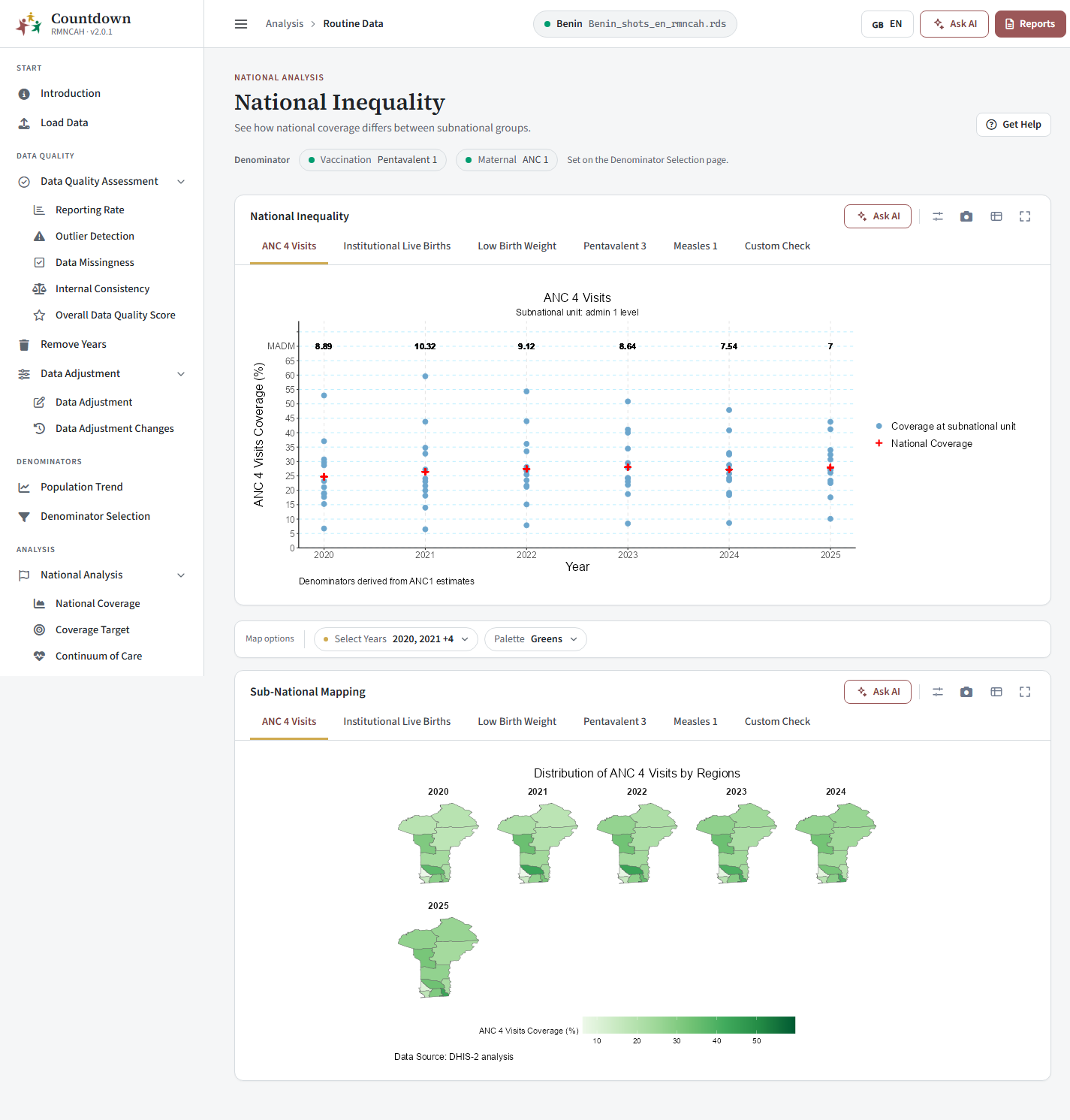 National inequality
Equity Assessment (survey data)
Purpose. Show inequality between population groups (household groups), using household survey data from the survey files loaded in the wizard.
When to use it. When survey files were loaded (or the built-in ones cover your country) and you want to know who is being left behind. In the Vaxx app this is the Survey Data page under National Inequality.
Choose the Equity Type
Area (Rural, Urban), Maternal Education (No education, Primary, Secondary or higher) or Wealth Quintile.
Choose the indicator
RMNCAH
ANC 4 Visits, Institutional Live Births, Low Birth Weight, Pentavalent 3, Measles 1 or Custom.
Read the equiplot
The chart is titled “Inequalities in … coverage by …” and shows coverage for each group. How to read it: Equity assessment > Interpretation of equiplots.
RMNCAH
Each group has its own line over time, with the national trend for comparison. Generate Report opens the national inequality report.
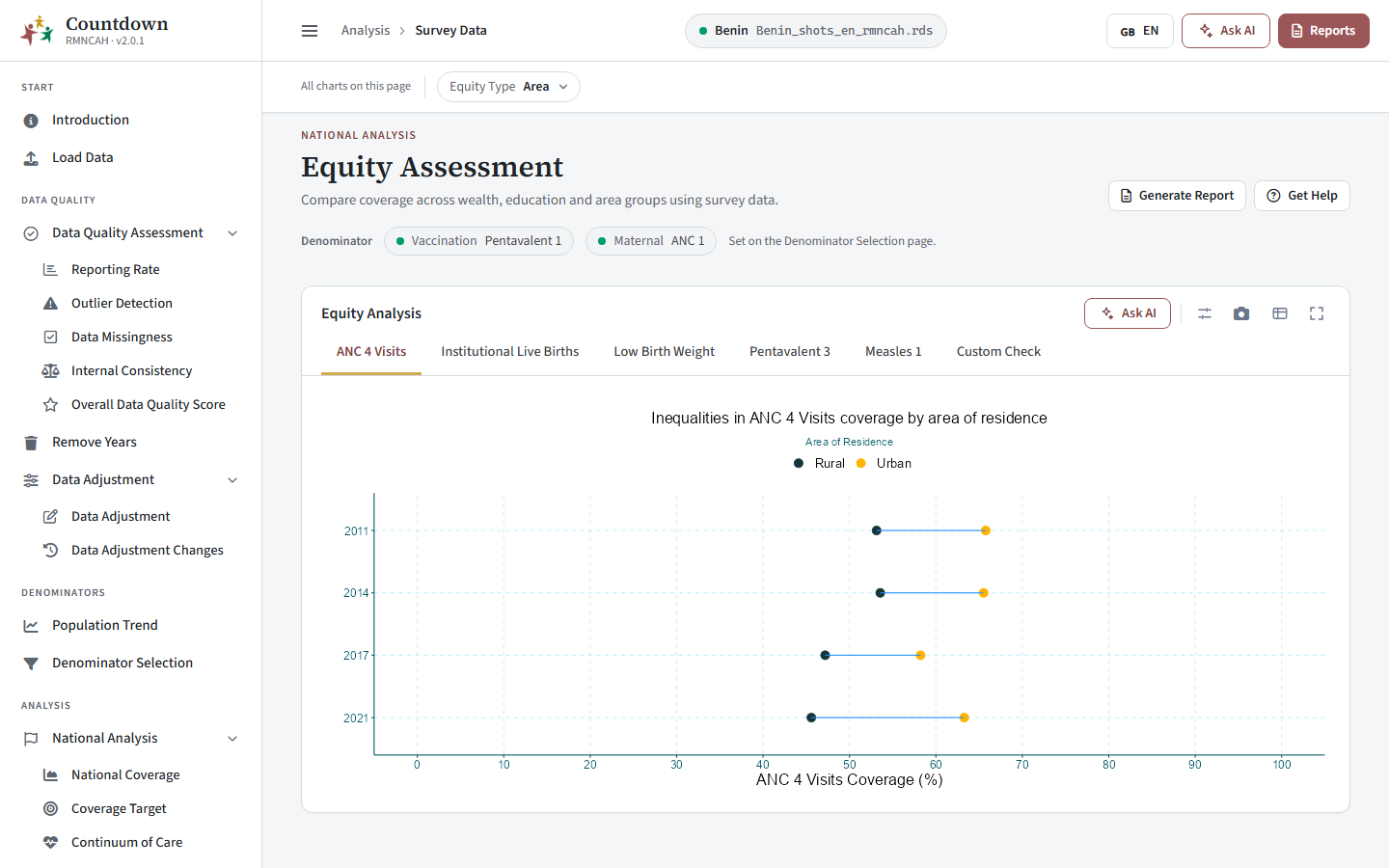 Equity by area of residence
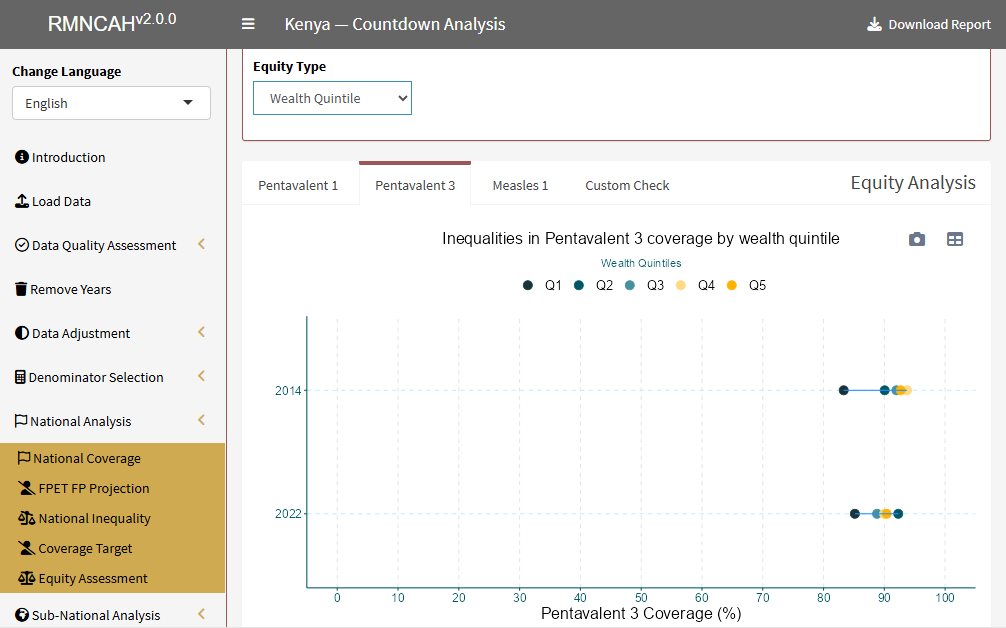 Equity by wealth quintile
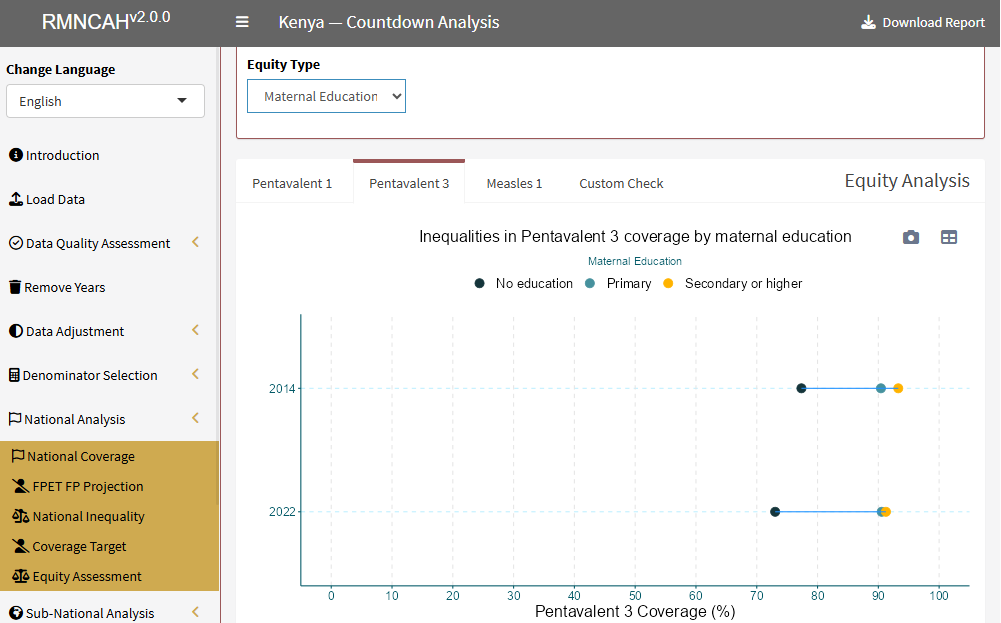 Equity by maternal education
Common pitfalls
- The equity pages rely on the survey files and the survey year from Load Data.
- Coverage and target pages change when you change the denominator. Record which denominator a result used (the chart caption shows it).
Pitfalls in reading these results: National coverage > Interpreting the national trend and Common pitfalls; Subnational analysis > Inequality; Equity assessment > Common pitfalls.
Next: Sub-national analysis.