This page describes the necessary steps to set up the analysis workbench
Create a working folder
The first step in the analysis workflow is to prepare a dedicated working folder. This folder is where you keep the input files for the app, and where the system creates the derived data file used for faster future loads.
- Choose a clear directory name that you can easily remember and reference, preferably in your local environment.
- Place the raw upload (Excel) files in that folder before starting the app.
- Keep any related documentation, data or country-specific files together so the working folder is self-contained.
Uploading HMIS data
For the initial upload, use the Excel workbook generated from HMIS/DHIS2 exports. For subsequent uploads, use the cached .RDS file, which is automatically generated and stored in the working folder when the Excel file is uploaded.
The app accepts common tabular data formats for the DHIS2 upload:
- Excel workbook:
.xlsxor.xls - Comma-separated values:
.csv
- The DHIS2 data indicators are defined here.
Automatic RDS creation
- When you load an Excel file for the first time, the app automatically converts and saves a companion
.rdsfile in the same working folder. - On subsequent loads, the app checks for the existing
.rdsfile and uses it to speed up data reloads.
This means the first load may take slightly longer while the Excel file is read and transformed. After that, the app opens the saved .rds file much faster.
Embedded datasets
In addition to the uploaded DHIS2 dataset, the app includes internal reference datasets that are linked to the country whose data was uploaded.
These embedded datasets are:
- UN Estimates
- Survey data
- WUENIC Estimates
- UN mortality data
- Family Planning Estimation Tool (FPET) data
Because these datasets are named according to the country whose DHIS2 data is loaded, the app can automatically match the uploaded file to the correct reference set.
Best practice
- Use one working folder per country or DHIS2 export batch.
- Keep the original Excel source file and the generated
.rdsfile together. - Do not rename the
.rdsfile manually; the app manages that file automatically.
National Parameters for Denominator Calculation
- These parameters are used to support selection of denominators for service coverage analysis within the RMNCAH analytical framework.
- They are typically derived from the most recent national survey (e.g., DHS, MICS) and are applied uniformly across subnational units.
Tip
- The default values are extracted from the available country survey data. Users can update these values if they have more recent, validated values.
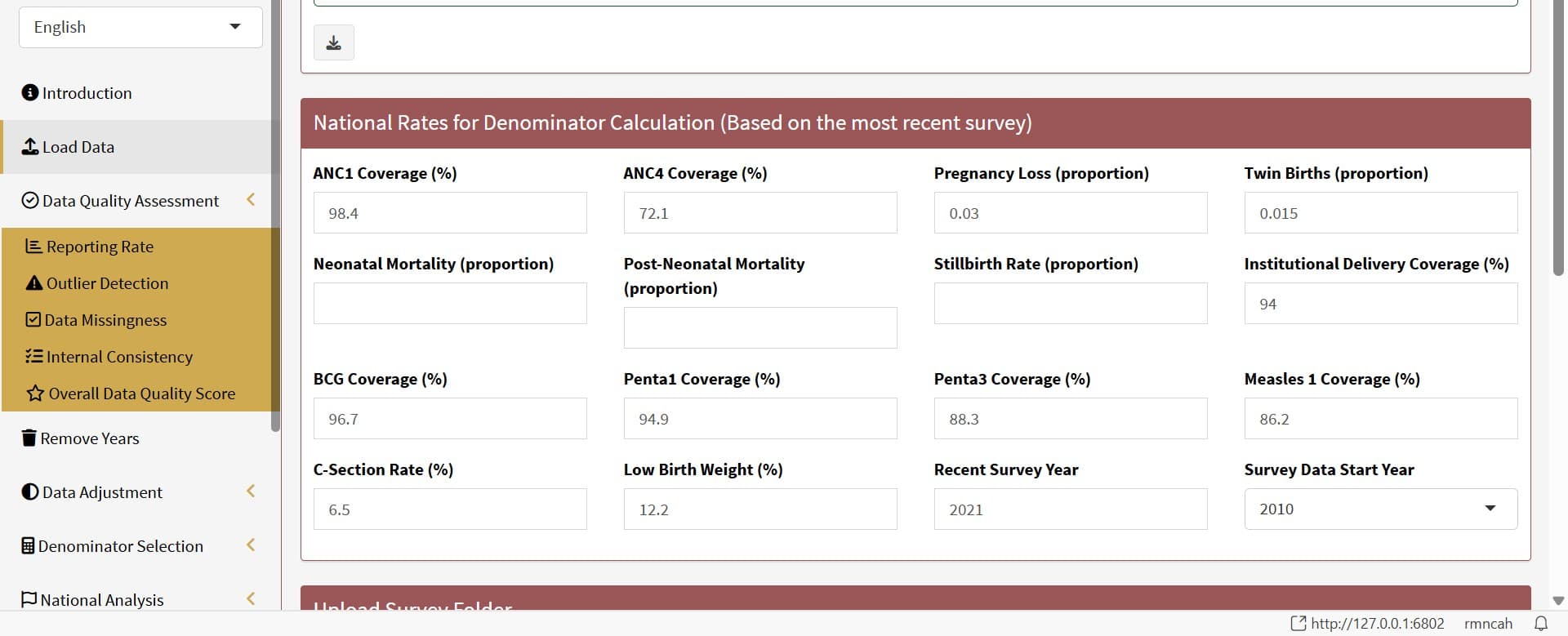
| Parameter | Definition |
|---|---|
ANC1 Survey (%) | Percentage of women aged 15–49 with a live birth who received at least one antenatal care (ANC) visit during their last pregnancy. (Example: If 940 out of 1,000 women had at least one ANC visit, the ANC1 coverage is 94%.) |
ANC4 | Percentage of women aged 15–49 with a live birth who received four or more antenatal care visits during their last pregnancy. (Example: If 680 out of 1,000 women had ≥4 ANC visits, ANC4 coverage is 68%.) |
Pregnancy Loss (proportion) | Proportion of pregnancies that ended in miscarriage, abortion, or stillbirth out of all reported pregnancy outcomes. (Example: If 80 of 1,000 pregnancies ended in loss, the proportion is 0.08) |
Twin Births (proportion) | Proportion of live births that are twins out of all live births. (Example: If 30 out of 1,500 live births were twins (i.e., 15 twin pairs), the proportion is 0.02) |
Neonatal Mortality (proportion) | Proportion of live births that die within the first 28 days of life out of all live births. (Example: If 20 out of 1,000 live births died within the first 28 days, the proportion is 0.02) |
Post Neonatal Mortality (proportion) | Proportion of live births that die between 28 days and 11 months of life out of all live births. (Example: If 15 out of 1,000 live births died between 28 days and 11 months, the proportion is 0.015) |
Stillbirth Rate (proportion) | Proportion of pregnancies that ended in stillbirth out of all reported pregnancy outcomes. (Example: If 10 out of 1,000 pregnancies ended in stillbirth, the proportion is 0.01) |
Institutional delivery | Percentage of live births that occurred in a health facility. (Example: If 850 out of 1,000 live births were in a health facility, the institutional delivery coverage is 85%.) |
BCG Coverage (%) | Percentage of infants aged 12–23 months who received the Bacillus Calmette-Guérin (BCG) vaccine. (Example: If 950 out of 1,000 infants received the BCG vaccine, the BCG coverage is 95%.) |
Penta1 Coverage (%) | Percentage of infants aged 12–23 months who received the first dose of pentavalent vaccine.(Example: If 920 out of 1,000 infants received the first dose, the Penta 1 coverage is 92%.) |
Penta 3 | Percentage of infants aged 12–23 months who received the third dose of pentavalent vaccine. (Example: If 850 out of 1,000 infants received the third dose, the Penta 3 coverage is 85%.) |
Measles 1 Coverage (%) | Percentage of infants aged 12–23 months who received the first dose of measles vaccine. (Example: If 900 out of 1,000 infants received the first dose, the Measles1 coverage is 90%.) |
C-Section Rate (%) | Percentage of live births that were delivered by caesarean section. (Example: If 150 out of 1,000 live births were by C-section, the C-section coverage is 15%.) |
Low birth weight | Percentage of live births that were low birth weight (less than 2,500 grams). (Example: If 100 out of 1,000 live births were low birth weight, the low birth weight coverage is 10%.) |
Recent survey Year | The calendar year in which the survey was conducted and from which vaccine coverage estimates (e.g., BCG, Penta1/3, Measles1) are drawn. (Example: If the survey was conducted in 2022, that is the vaccine survey year). |
Survey Data Start Year | The calendar year from which the survey data starts. This is used to determine the time period for which the survey data is relevant. Ideally, it is recommended to use the two most recent surveys for this analysis.(Example: If a country has survey data for 2008, 2013, 2018 and 2023; the Survey data start should be 2018 (two most recent)). |