RMNCAH and Vaxx apps
DataSuite has two Countdown apps for routine health facility data: the RMNCAH App and the Vaxx App. Both take a country’s routine facility data (usually exported with the Data Extractor), check and adjust it, choose denominators, and estimate coverage, inequalities and trends. They follow the same CD2030 analytical framework and share most of their pages, so this guide describes them together. Where the apps differ, the guide shows an RMNCAH and a Vaxx tab; the tab you choose is remembered from page to page.
What each app is for
RMNCAH app
The RMNCAH App within the CD2030 DataSuite is designed to support the analysis of routine health facility data for key RMNCAH indicators. It provides a standardized framework for transforming raw DHIS2 data into meaningful insights on service coverage, data quality, and equity.
Building on the outputs from the Data Extractor, the RMNCAH App guides users through a structured analytical workflow that includes data validation, adjustment, and indicator computation. This ensures that analyses are consistent, reproducible, and aligned with the CD2030 methodological approach.
The app enables users to:
- Assess data quality through standardized DQA metrics
- Apply numerator and denominator adjustments
- Generate national and subnational coverage estimates
- Explore inequalities and trends across time and geography
- Produce outputs for reporting, including synthesis reports and visualizations
By integrating methodological rigor with a user-friendly interface, the RMNCAH App facilitates evidence-based decision-making and supports countries in monitoring progress across RMNCAH priorities.
Vaxx app
The Vaxx App is the DataSuite app for immunization coverage and inequalities. It takes a country’s routine facility data (usually exported with the Data Extractor), checks and adjusts it, chooses a denominator, and then estimates coverage for routine vaccines, dropout, zero-dose and under-vaccinated children. Coverage can be compared with survey and WUENIC estimates, followed over time, split by region, district, area of residence, maternal education and wealth, and tracked against global targets.
It follows the same CD2030 analytical framework as the RMNCAH App, but is narrowed to immunization: the indicator list, the survey inputs, the adjustment factors and the analysis pages are all immunization-specific.
Who uses which
RMNCAH app users
The RMNCAH App is written for the country analytical team of a CD2030 review: monitoring and evaluation officers, HMIS and DHIS2 data managers, programme managers for maternal, newborn, child and adolescent health, and the analysts who prepare annual health sector reviews. You do not need to write code. Everything is done through pages, filters, charts and tables. Analysts who prefer scripting can work on the same saved dataset through the DataSuite chat assistant (see Exports, reports and AI).
Vaxx app users
- Immunization programme managers and national EPI analysts who need routine coverage estimates that are quality-checked and comparable with surveys.
- Analysts in the Countdown immunization coverage and inequalities work, at national and district level.
- Anyone who needs a Word, PDF or PowerPoint report of data quality and coverage for a country.
Differences at a glance
| RMNCAH App | Vaxx App | |
|---|---|---|
| Focus | Reproductive, maternal, newborn, child and adolescent health | Immunization |
| Indicators | ANC (including ANC4, IPT, syphilis, IFA, HIV test), delivery, C-section, low birth weight, PNC, stillbirths and deaths, a small set of vaccines, outpatient and inpatient visits | ANC1, institutional deliveries and live births, BCG, IPV 1-2, Measles 1-2, OPV 1-3, Pentavalent 1-3, PCV 1-3, Rotavirus 1-2, plus derived dropout, zero-dose and under-vaccinated indicators |
| Reporting Rate services | ANC, Institutional Delivery and Vaccination, plus outpatient visits | ANC, Institutional Delivery, Vaccination |
| Consistency checks | ANC1 and Penta1, Penta1 and Penta3, plus a custom pair | ANC1 and Penta1, Penta1 and Penta3, OPV1 and OPV3, IPV1 and IPV2, plus a custom pair |
| Adjustment factors | ANC, Delivery and Vaccines K-Factors, plus an OPD K-Factor | ANC, Delivery and Vaccines K-Factors |
| Denominator | A maternal and a vaccination denominator | One vaccination denominator |
| Coverage targets | ANC4, institutional live births and vaccine | Vaccine (BCG, Penta3, Measles 1) and Dropout |
| Survey inputs in the wizard | Vaccine coverage values, ANC1 and institutional delivery, plus ANC4, C-section, low birth weight and UN mortality estimates | Vaccine coverage values, ANC1 and institutional delivery |
| Extra pages | Bayesian analysis, continuum of care, family planning, mortality, service utilization, MCH curative index, health system performance, private sector | None |
| Saved copy | A saved copy for its own indicator group (_rmncah.rds) | name_vaccine.rds |
A dataset saved by one app cannot be opened in the other. Opening an RMNCAH .rds in Vaxx is refused with a message that the dataset was built for a different indicator group.
What you can load
Each app opens one dataset at a time. It accepts four file types:
| File type | What it is | Typical use |
|---|---|---|
.xlsx, .xls | Excel workbook with the required sheets (Analysis setup > HMIS data), as produced from the Data Extractor | First load of a country dataset |
.dta | Stata file | First load, or a master dataset downloaded earlier |
.rds | The saved dataset that the app creates when you finish loading | Resuming work: every loading step is already done |
RMNCAH
During the load wizard you can also add optional survey files (.dta), a custom shapefile and country-specific UN, WUENIC and UN mortality reference files (.dta). Built-in reference data for the country are used when you add nothing. See Getting started.
How it relates to the Data Extractor and the methodology
- The Data Extractor produces the routine data file. The apps start where the extractor stops.
- The methodology chapters explain why each analysis is done and how to interpret it. Every page guide in this section ends with a link to the matching chapter, and the Get Help button in the app opens the same chapters.
Layout and navigation
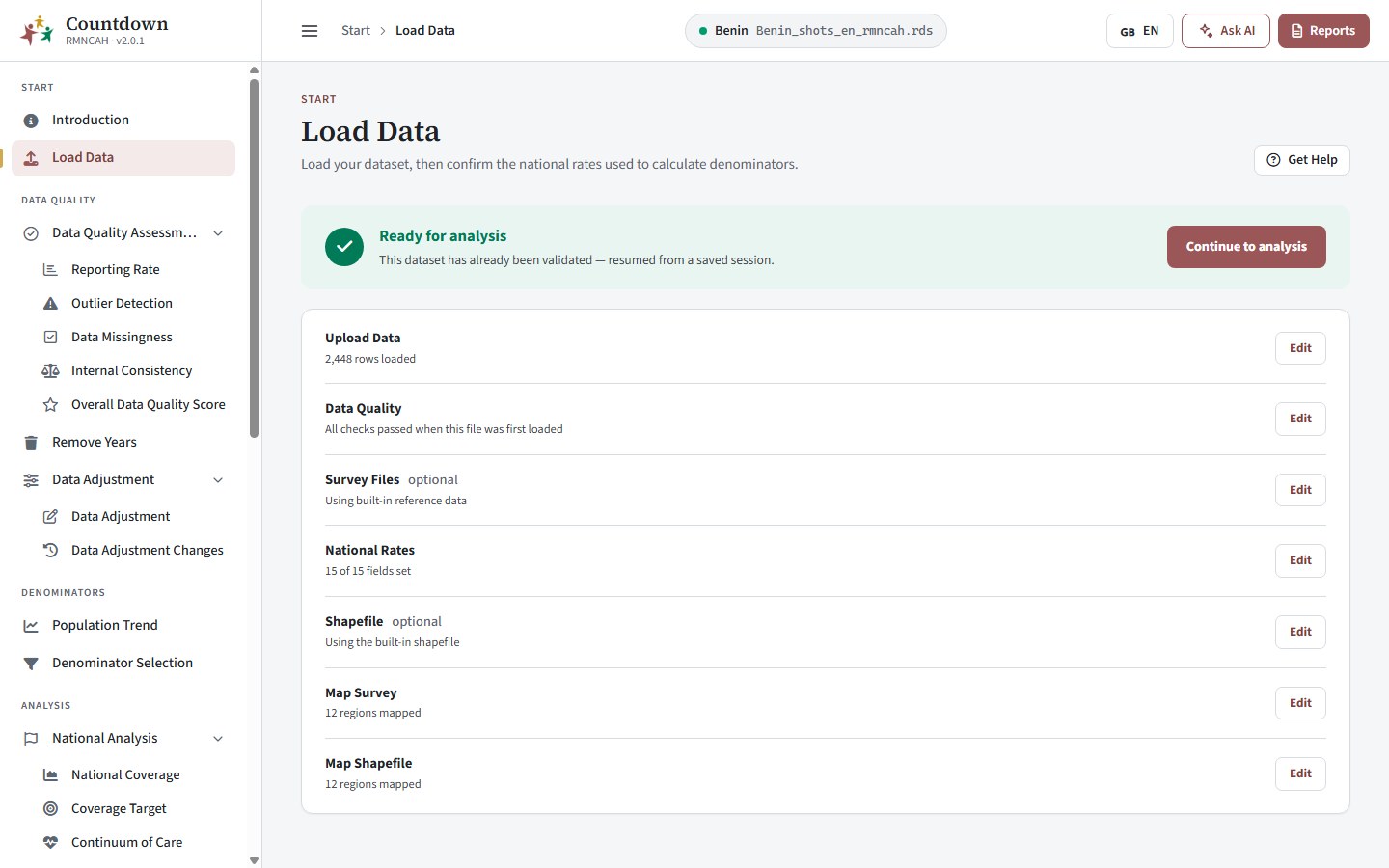 RMNCAH App navigation panes
- Sidebar. The pages are grouped in sections (see Page groups). Change Language at the top switches the app between English, French and Portuguese.
- Locked pages. Pages are greyed out until they can be used. Load Data is always open. The Denominators and Analysis groups and Output (Reports) unlock only after you have finished loading a dataset and run Data Adjustment.
- Page header. Each page shows its title and a one-line subtitle. Get Help opens the matching methodology (help) chapter. Pages that feed a standard report also show Generate Report. The header also holds the language switch (English, French, Portuguese). Analysis pages show a Denominator row that tells you which denominators the numbers were divided by; it is set on the Denominator Selection page.
- Filter bar. Filters appear as chips at the top of a page, for example Indicator, Admin Level, Performance Threshold or Select Years.
- Chart cards. A card usually has one tab per indicator plus a Custom tab where you pick any other analysis indicator. The card toolbar downloads the chart (Download Plot, PNG) or its numbers (Download Data, Excel), and offers tools to edit labels, change the view or style, and expand the chart.
- Tables. A control marked This table only (year or indicator) changes that table alone. Each table has its own Download Data button.
Page groups
RMNCAH
The sidebar groups the pages in five sections: Start, Data quality, Denominators, Analysis and Output. Within them the pages form these groups:
| Group | Pages | Purpose | Guide |
|---|---|---|---|
| Start | Introduction, Load Data | Open the dataset and confirm national rates and mappings | Getting started |
| Data quality | Reporting Rate, Outlier Detection, Data Missingness, Internal Consistency, Overall Data Quality Score | Judge whether the facility data can be trusted | Data quality |
| Data preparation | Remove Years, Data Adjustment, Data Adjustment Changes | Exclude unreliable years and correct for incomplete reporting | Data preparation |
| Denominators | Denominator Assessment, Denominator Selection | Compare population sources and choose the denominators | Denominators |
| National analysis | National Coverage, Coverage Target, National Inequality, Equity Assessment | National coverage, targets and equity | Coverage, equity and targets |
| Sub-national analysis | Sub-National Coverage, Sub-National Inequality, Coverage Target | Regional and district coverage, spread and targets | Sub-national analysis |
| Advanced analysis | Bayesian Analysis, Continuum of Care, FPET FP Projection | Modelled estimates, care pathway, family planning | Advanced analysis |
| Mortality | Institutional Mortality, Mortality Mapping, Mortality Completeness | Institutional maternal, stillbirth and neonatal mortality and how completely deaths are reported | Mortality |
| Service utilization and health system | Service Utilization, MCH Preventive vs Curative Index, Health System Performance, Public/Private Share | Outpatient and inpatient use, health system inputs and the private sector | Service utilization and health system |
| Output | Reports | Word, PDF and PowerPoint reports (standard reports, synthesis chartbook, one-pager), downloads and AI-assisted analysis | Reports, Exports, reports and AI |
Recommended order
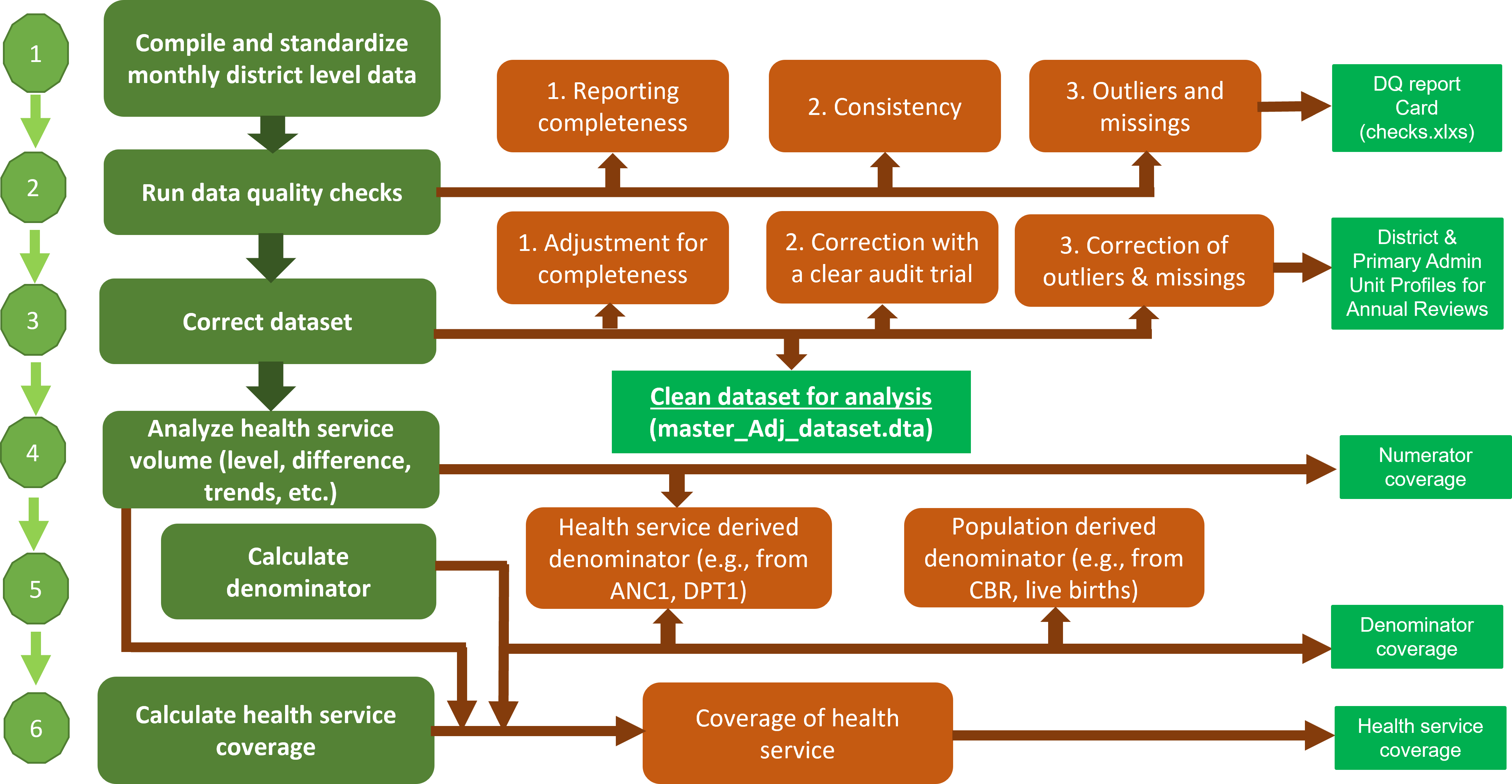 Countdown analysis workflow
RMNCAH
The analysis steps page walks through the same sequence and links each step to its methodology chapter.
Methods behind each step are described in the framework chapters: data quality, adjustment, denominators, coverage, equity and sub-national analysis. Indicator definitions are in Indicator definitions.